
Install PSP Custom Firmware 5.50 GEN-D
 Posted by
  October 21, 2009 •

The Gen TEAM has just released Custom Firmware 5.50 GEN-D which fixes the troubles that 5.50 GEN-C brings and a bit more. What’s new with 5.50 GEN-D? It allows you to play ISOs and CSOs that require 5.55 or 6.00 firmware without having to patch the eboot.
If have a PSP-3000 / PSP-2000 TA088v3 however, you’re still stuck with patching.
Important: DO NOT attempt to install this on PSP-3000 / PSP-2000 TA088v3. YOU WILL BRICK YOUR PSP IF YOU DO.
Requirements:
- A PSP with custom firmware installed AT LEAST 5.00 M33-6. If you’re having problems installing 5.50 GEN-D, read the troubleshooting part below.
- PSP battery that’s at least 78% full
- Download: XGen Updater
- Disable ALL plugins.
- Back up your save files (so that if they get corrupted, you still have backups)
Recommended update: Install 5.50 GEN-D3 after installing 5.50 GEN-D.

How to install 5.50 GEN-D using XGen Updater
- Connect your PSP to your computer
- Extract the XGen Updater to your PC
- Copy the PSP folder and the 550.pbp file to the root of your memory stick
- On your XMB, go to Game > Memory Stick to start XGen Updater
- Select Enter on the screen above
- Choose Flash install CFW 5.50 GEN-D
- After all process is complete, press X. Your PSP will reboot.
- Congratulations, you’ve just installed 5.50 GEN-D


Important: 5.50 GEN-D2 Patch!
After installing 5.50 GEN-D, you can install the bugfix 5.50 GEN-D2. The changes have been listed on the changelog below.
To install just download 5.50 GEN-D2 and use the same steps above.
How to install 5.50 GEN-D2
- Extract the 5.50 GEN-D2 files to your computer.
- Copy the PSP folder to your PSP’s memory stick. (Yes, just drag the whole folder there)
- Disconnect the PSP from USB
- Run 5.50 GEN-D2 Updater from under Game on your PSP’s XMB
- After all process is complete, press X. Your PSP will reboot.
- Congratulations, you’ve just installed 5.50 GEN-D2.
What do I get with custom firmware 5.50 GEN-D and GEN-D2
Custom Firmware 5.50 GEN-D Features:
- All features of 5.50GEN-B2 are available.
- Compatibility with games requiring firmware 5.51 with no additional handling (now, you don’t need Game Decrypter)
- Compatibility with most of games normally protected and refusing to be ran on a Custom Firmware (Full Metal Alchemist, Soul Calibur, etc). Yoshihiro has created a system to run them and he succeed to make this system more stable and it’s now compatible with all PSP, unlike the 5.50 GEN-C.
- Possibility to connect at the Playstation Store via MEDIAGO, to retrieve game and goodies without having to install Fake USB or other complicated stuff.
- Support for 480×272 AVC video playback.
Fixes for Custom Firmware 5.50 GEN-D2:
- Evangelion Anti CFW patch Fix
- Fix Wlan TKIP in game loop : pes 2009 , fifa , motorstorm , GTA cw ect….
- Fix Video Output With 5.5X and 6.X Games like GTA Chinatowns War
- Fixed recovery menu with make Pandora and make battery normal
- removed splash screen http://www.pspgen.com but you have another spash screen in red color for let you know if the decrypter work .
After installing GEN-D2, How about some Free PSP Games?
Troubleshooting:
If you’re having problems getting the black screen when installing 5.50 GEN-D, you need to reflash your PSP to 5.00 M33-6. If you’re already using 5.00 M33-6, upgrade to 5.50 GEN-B2, then run the 5.50 GEN-D installer:
Requirements for reflashing your PSP to 5.00 M33-6:
- Download: Hellcat’s Recovery Flasher
- 500.PBP | 500.PBP
- Extract the Hellcat’s Recovery flasher and copy it to PSP\GAME folder
- Copy the 500.pbp to the Recovery folder (PSP\GAME\RECOVERY)
- Run Hellcat’s Recovery flasher from your XMB
- Reflash to 5.00 M33-6
If you don’t want to reflash, do the following:
- Restore your PSP to the original settings. No CXMBs, no fonts, etc
- Format flash1 and reset settings (recovery mode)
- Set theme to orginal Sony theme
- Turn off all plugins
- Reformat memory stick
If it still doesn’t work, just update to 5.50 GEN-B2 before running the 5.50 GEN-D installer.
Credits:
Dark_AleX – For his M33
Genyus – By GEN





i have 5.50 gen b2, so to install gen d i have to download the whole firmware and install that again or is they an quicker way to flash my psp
C is working good enough for me i might as well stick with it for awhile
My version is 5.50 GEN-B, but when I try to upgrade to CFW 5.50 Gen-D it says that the file is corrupted…
Does anyone know what is the problem?
Thanks
First you have to upgrade to GEN B2 or you will brick your PSP. I bricked mine twice trying, thank god for pandora. I normally get corrupted data when I put the patch at the wrong location you have to copy the enitre folder “5.50-genB2-update” into psp/game and it should work fine.
hey Im currently at 5.50 gen b2 … can i still upgrade to 5.50 D??
Yes you can.
My version is 5.50 GEN-B, but when I try to upgrade to 5.50 Gen-D the screen goes black and nothing happens. please help
At what point does it go black? Do you see this screen?
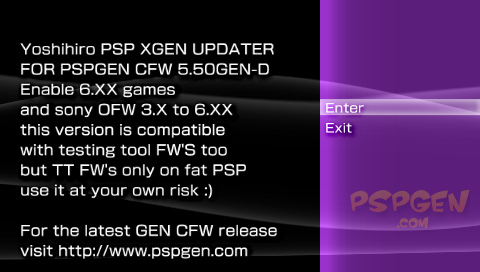
I had the same problem. You need to put GEN B2 before it will work otherwise you will brick yuor PSP like I did. You can skip GEN C though and go straight to GEN D.
but does your PSP still work??
please if anybody can tell us what to do…
does it work on 5.50 GEN-B2??
Yes it’ll work on GEN-B2.
Yes the update works fine but you must have GEN B2 installed or your screen will go black (bricked.
erm… i’m using 5.00 m33-6. and i want to play Naruto Shippudent Legends: Akatsuki Rising. Like it said, i can go directly from 5.00 m33-6 to 5.50 gen D? yes? soo.. what is the version.txt for. T___T my friend told me in order to play a game, you need to edit…something..=/
the version.txt used to work for SOME games checking said file for your firmware version. It’s long been rendered useless by Sony. Right now 5.50 GEN-D is the most fool-proof way of playing your games in ISO/CSO format.
I’ve just upgraded my psp 2000 to GEN-D from GEN-B2. Everything works fine, however I did have to enter recovery mode (R trigger with Power trigger) and change UMD mode to M33 driver in order for it to play iso’s.
Please note that for anyone who is having probs-you MUST have GEN-B2 and upgrade from this.
Umm no? The updater worked fine when I updated a PSP with 5.00 m33-6 to 5.50 GEN-D
wow … thanks … now i can save the trouble of long decrypting of the game… hmm one more question … can the decrypted games for 5.50 gen B work in Gen D ….
Haven’t really tried it 🙁 Will check when I get home.
I tried my 5.00 M33 decrypted GT, naruto and tales of vs. They’re all working fine 😀
thank u very much…
amm.. alright.. lets try this..:D
Hi sylv3rblade! Any advice on how I can downgrade my PSP-2000? I was able to play custom ISO/CSO before but I wrongly updated it to 6.10 OFW, and now nothing seems to work.
I am pretty sure that you need a pandora and magic stick to downgrade.
Sorry if my info was incorrect. I was just going by the pspgen.com websites info.
Ok thanks for the tut info, but im running gen-b (full) already and when i try to upgrade, the screen goes black and nothing happens. This litrally after i click the icon to run firmware, i do not even see the installation screen. :/
Help? 🙁
Do one at a time and see if it works:
Restore your PSP to the original settings. No CXMBs, no fonts, etc
Format flash1 and reset settings (recovery mode)
Set theme to orginal Sony theme
Turn off all plugins
Reformat memory stick
I had the same problem, this was rectified by updating to GEN B2 before going to GEN D and it worked fine after that. BTW your psp is bricked.
Hi sam, i am in the same situation as you, black screen and no menu screen when trying to install the gen d, Did you find a soloution?
Sorry to have bothered you but i am desperate in wanting this to work
Thanks
JJJ
this update still has problems play fifa 10 and gta cw. i think GEN D2 is going to be release tomorrow
Yep. I will update the post to include the patch when it releases.
i’m in the same boat as you sam and greenday gen b …do everything right and black screen…so i’m now gonna fomat my 8gig stick to see if that makes a diff…i’ll post to let you know
Hey sylv3rblade
I am on 5.50Gen-b, can I use this directly ? or I have to have b2 ? please reply
thank you in advance
Yes you can upgrade from GEN-B 😀
I tried to format the memory and flash 1, original settings, disaabled all plugins, used all drivers, still get black screen after I run the homebrew
This looks more pervasive than I thought, I’ll look in to a solution and post it right here.
What folder would I put the iso’s in. I’ve tried all three in the psp game folder. Any help would be appreciated.
You have to create a folder named ISO in the root folder of your memory card.
Just format your MS on your modded PSP and all the folders will be created including one that is called “ISO” This is the folder that you put your games in. Also inside the ISO folder there is a video folder for ISO movies. If you want just regular mp4 movies you put them into the video folder that is beside the “seplugins” folder.
Aha, found a solution, Gen-b does not work, I just updated to b2 and it worked
Well, I just tried going from GEN B to GEN D on my PSP 1001 and I bricked it twice. Make sure you have your handy pandora near by.
Alright Fixed. You must update to GEN B2 before you put GEN D. You can skip GEN C. I tried running a new game that did not work before ie OBscure and it now works. It did not work with Persona.
Duely noted. I guess I’m one of the few people that got it working from 5.00 M33-6.
do you have a link to the updater for gen D? can’t find a working one
It’s on the requirements part of the post.
does the patch really has a flasher?? what does this actually do?? is it safe to patch from Gen D to Gen D2?
Yes. GEN-D eliminates the need to use Game Decryptor since it’s build right in. And yes, you can safely update to GEN-D2 from GEN-D.
Hi, i have tried to install gen d on my psp 1001 but having clicked on Xgen updater my psp goes to having a black screen. I am currently on version 5.50 gen b full. I have reformatted my memory card but still no joy, battery is 100% charged, any help will be appreciated.
Have you upgraded to 5.50 GEN-B2 before updating?
Hi sylv3rblade, yes i have upgraded to 5.50 gen b before updating, this was many weeks ago, thought i would update with newer cfw but like i said i am welcomed with a black screen when the sony psp screen appears after clicking on the 5.50 gen d loader.
Any suggestions on why or shall i pandora battery to version 1.5 and load the cfw from scratch??
Fixed the links for GEN-D2. They were pointing to the wrong files.. silly me >_>
can you upgrade direct from 5.00 m33-6 or do i have to go gen b then c then d
I was able to upgrade from 5.00 M33-6 but so many people are having problems with doing just that so the best bet is to go from 5.00 M33-6 -> 5.50 GEN-B2 -> 5.50 GEN-D
Hi i have updated my psp cfw from 5.00m336 to 5.50 and then applied the update to 5.50b full and then tried updating to 5.50 gen d. THIS is where i have the problems. The psp just freezes – black screen when you click on the gend updater.
You absolutely need to update to GEN B2 before trying or you will brick your PSP.
Hi psp was updated to gen b and then gen b2 sorry if i did not make that clear
I just updated PSP star wars edition from 5.00 M33-6 directly to GEN D without any issues. Just remember to go to recovery mode after you are done and enable the VSH menu. Once done, switch to M33 drivers.
Hi Gonzo, i have just borrowed and updated my brothers psp, i upgraded from CFW 3 to 5.00 m336 and then updated to 5.50 gen d without any problems.
So i am going to downgrade my psp to version 5.00m336 and then upgrade to 5.50 gend
So from all this upgrading to 5.50 gen d from 5.50 gen b2 will cause problems – in my experience anyway
THANKYOU ALL SO MUCH WILL KEEP U UPDATED ON THE SUCCESS OF MY PSP SOON
I have applied the update to d2 was successful.
I have not loaded cloudy with a chance of meat balls that did not run on my psp with 5.50b2 and noe works flawlessly.
Can anyone tell me how to downgrade from5.50genb to 500m336??
or do i just downgrade using pandoras battery and start from scratch?
Thanks in advance
You can use the Hellcat’s recovery tool on this page to install 5.00 M33-6
Hi..
I’ve already installed cfw 5.50 gen-d2 to my psp. But can I delete the 550.pbp file in the root of my memory stick or should that file stay in the memory stick?
Yep. You only need it to install GEN-D. You can remove it now.
Hi downgraded the firmware and upgraded to 5.50 gend2 on both psps, games work a charm
thankyou
will this upgrade allow me to play games online
i got 5.50 gen a full and cant play syphon filter combat ops online tells me i gotta upgrade just wanna know if this d2 fixes that
well what i did i ubgraded from gen b but if you have m33 and cannot upgrade directly to D then upgrade to B all you have to do and drag the file into game folder run it install it then upgrade to D thats what i did hope this helps
PLease help.. I have a psp 1000 and I have tried to update to gen D, but every time i try, my psp screen just goes black. It starts to load, well it looks like, and the screen just goes black and stays there. What am I doing wrong?
What is your current firmware? I suggest upgrading to 5.50 GEN-B2 before upgrading to GEN-D
Hi Jesse i had the same problem you had, I was currently on 5.50 gen b2 and tried upgrading to 5.50 gend/2 but as soon as i clicked on the update icon of gen d i got the black screen.
My resolve of this was to padora the psp back to 3.71m33, upgrade to 5.00 and THEN upgrade straight to 5.50GENd and the D2.
Beleive me it worked. In my opinion if you have 5.00GENB/B2 you will have problems upgrading all though there are some of you that have successfully managed to do it from 5.50 gen b
Hope that helped
First thank you sylv3rblade for putting together an explanation of how to updat to the latest firmware. I have a question that may be off topic or addressed else where so sorry if it is. I have a PS3 and was able to connect my PSP 1000 M-33 5.00 to it directly and do the remote play. I could never make the connection over the internet and was told to update the firmware on the PSP so I thought this would help. I still cant work the connection over the internet and now i cant even establish the connection directly between the PSP and PS3. it is not a huge deal because i know how to down grade to M-33 5.00 if i want but i was wondering if anyone knew about a way to get the systems linked up with out using Sonys lame ass official firmware.
Thx a million
I had zero hiccups, having not turned on my PSP for over a year.
Started at 3.40 OE-A.
then
3.52 m33
then
3.52 m33-4
then
5.00 m33-6
then straight to the finals:
5.50 GEN-D
This is on a day 1 launch PSP-1001 TA-079 which I originally bought for Gran Turismo. Zero issues every step of the way, & played a few laps for the first time on the fantastic GT. Hard to say if it was worth the wait…just glad it’s finally here, & 60fps of mobile speed. ;]
Hey silv3rblade,
I’m up and running GEN-D2 and it’s great! When I open the “GEN Recovery Menu” and go to “Configuration” I see “Use M33 Network Update (Not Yet)”. What is it used for when I am no longer running M33? Can I use it to connect wirelessly to the internet for GEN updates? Thanks!
It’s part of the older M33 code. If you remember, starting 3.90 M33, you can update your CFW to a newer M33 cfw by using the network update. No word on when the GEN team will be able to get this running for their CFW.
Hi all:
I patched my 5.00 m33-6 straight to Gen D and it worked like a charm, but before I patched it to D-2, none of my .iso would work and it scared the living shit out of me. After I put in the D2 patch it worked like a charm though.
Could someone please tell me what happened then? I’m terrified of bricking my PSP, did that whole this-game-could-not-be-started thing mean I semi-bricked it?
Thanks a lot in advance!
Probably just the default setting of the UMD mode on GEN-D.
Woo, phew, thanks a lot sylv3rblade!!
just go direct to gen D from 5.00 m33 -6, no pandora needed. superb!!!
thanks to yoshiro & Genyus..
thanks work great
best site
got psp 1006 (phat). with a cfw 5.50 gen b full. then i found the gen b2 so i installed it, when i tried to open soul calibur b.d, it wont load and it froze on the match screen with an error 4 digit code 1441. so what i did is to download again the 5.50 gen b full and the scbd game play and works properly on my psp, so i am bit scared to download this latest gen d/d2 cfw. it might not work on my psp phat, any sugestions guys? thanks in advance.
I’ve got the same problem with jjj. I managed to install up to 5.50 gen b but i’ve got black screen when I tried to upgrade to 5.50 gen D. I went back to 5.00 m33-6 and try to upgrade directly to 5.50 gen D. But the same problem happend again…after I clicked on update then the screen went black.
Many thanks in advance.
dn
I can’t seem to play Resistance online. It says I need to update my firmware. Help please.
I am having the same problem. Can you play online?
I had a similar problem, I was on Gen-B2 couldnt update to Gen-D all i got was a black screen when running it, but i’d been taking the update folder of gen D and putting it in the PSP’s Game folder instead of at the memory stick root. so make sure you do this and the 550.PBP stays outside the PSP folder but again at the root. The english in the document supplied with the Gen-D isnt fantastic, just takes a bit of thinking lol
Not used my psp in nearly a year was on 5.01 before I started too, even though using ghostbusters worked on 5.50 Gen-B anyway!
Anyone else noticed if you try to update from an older firmware on a UMD, system says you have firmware 9.90 and don’t need too?
Hi Guys i need your help. I was on 5.50 Gen-D2 and it was working fine. A few days back when i came from from work i saw my psp with the mem stick popping out from the slot. It turns out that my son did something with the mem stick. I tested the psp and it is still working and i saved the new spongebob game to the mem stick. It was still working for a day but the in the next day when i was playing the spongebob game the game froze and i turned it off by long pressing the off button and when it started the spongebob game was corrupted. I think the mem stick is now broken due to this so i tried using a diff mem stick but when i go to the game in the xmb, its saying that there is no games there. the pictures are being read but why does the games not showing. please help me… thanks
i have 5.50 gen B in my psp 2000, will gen D and gen D2 work in my psp?
Just update to 5.50 GEN-B2 and you’re ready to go.
will it work in psp 2000?
Yep. GEN-D and GEN-D2 are patches for previous 5.50 GEN releases.
hey guys..
pls help me im a little bit troble updating
5.50 gen d2.. im using 5.50 b2..
what should i do?
Did you put the 550.pbp on the root of your memory stick?
i have cfw 5.00 m33-6. am trying to upgrade to 5.50 gen-d but everytime sony updater is updating my psp would shut off. where did i go wrong?
will this also work on a pspgo which i have just bought with no luck of trying to put games on it?
thanks will
Simply… No. There’s currently no custom firmware for the PSP Go.
Hey, so does 5.50 d2 work with ps1 games and the snesx and pictodrive (genesis) emulators?
and after installing this firmware, do i need to install pops or anything again? or will i be good to go as soon as i finish downloading?
thanks
Yep. 5.50 D2 is as compatible as it can get 😀
Just be sure to turn off your plugins before upgrading.
awesome man, thank you
yes.. u can play nes, snes & gba without any problem in gen D2. superb!!!
hi,what do u guys mean (off the plugins) before upgrading??
i have gen d2 but can’t play online can someone help or thers nothing i can do
i’m having the same issue, i can connect to the playstation store, but i can’t connect to my psn account. what should i do?
Its that 5.50 GEN-D2 compatible with the PSP 2000?
can 5.50 GEN-D2 play SMT persona after decrypting the game?
Ok, seems like its being a long time since I updated my PSP, how do you enter the recovery mode in 5.50 Gen-A ???
I try power + R and got nowhere…
I’m having a senior moment….
Hope this works. I’m running on Gen-a and i’m only upgrading to Gen-d2 to play Little Big Planet. ^^
sry may i ask no need to dl ofw b4 upgrade to gen a ?
No. Just follow the instructions listed above to the letter.
wow..this D2 version is outstanding!!!! fifa 10 works perfectly…..
oh yeah all my plug-ins are disabled too
guys this is a prob wid me i gt something wrong i think?
Well i upgraded to gen d2 by going to gen a then gen b then gen b2 then gen c then d then d2.by d2 u got playstation network.
when i acess it it says “You need to update your psp to use this”
To just see i go to update me psp it says “You dont need to update.You have the latest version.” i need to access it as there are some games i bought on my friends psp.so i wanna put them on my psp + he has psp!go.
so its in his internal memory card.
Need an answer please
The PSN Store (if you’re accessing it directly from your PSP) requires at least 6.00 OFW. The PSP Go can connect with the PSN because of it’s higher firmware version than 5.50 GEN-D.
my psp is a fat psp,th version is 3,43oea,how to make it 5,5?
THANKS buti solved it.i just did restore system settings and wolla i am happy.
thanks anyway.
i thought i solved it umtil but i tried and it dint work.well thanks
I have a fat psp,3,43oeA is the version,how can I upgrade to 5,5?can you tell me?because when I try to upgrade to 5, it is failed
hi just wanna know if it is safe to jump from 5.00 m33 to GEN D? will all the updates work? thanks!
i got a psp go how do i put the cfw on the psp go since it uses internal hard drive i dont have a memory stick for it
”Copy the PSP folder and the 550.pbp file to the root of your memory stick”
CAN U SPECIFY THIS MORE
coz i did this i pasted psp>game>update>eboot
but where do i paste the 550.pbp ???
i started the hack and it says did not find
550.pbp
*sigh*
Your computer sees your PSP (or your memory stick) as another drive when you connect it right? Just copy it to said folder.
Example:
If your PSP is connected as drive E:, copy the 550.pbp so that it would be read as E:550.pbp
does it work on psp-2004?
As long as you’re sure that your PSP is hackable, yes it’ll work.
If you’re not sure: http://atmaxplorer.com/2009/03/how-to-check-if-your-psp-can-have-cfw-installed/
Hey, I’m running CFW 5.00 M33-4. Do I still need to get a 5.00 M33-6 to update? I’m afraid if I don’t, I’ll kill my psp. Is it ok?
hi, im using a psp phat cfw gen b full. tried updating to gen d as mentioned above but i keep getting a black screen. is there anything im missing, thanks
Have you tried updating to gen-b2 before updating to gen-d?
i have the same problem and i have gen b2 full
I’ve updated the troubleshooting part of the guide. Please read it, follow the instructions and post the results here.
Just a quick question: If I update my 5.00 M33-6 to 5.50 GEN-D2, would I still be able to run iRShell (and other goodies like SNEStyl emulator?)?
There’s versions of several popular plugins for the GEN CFW. I’ll try looking into them and add them to the post.
Hey sylv3rblade,
Strange coincidence, but currently running GEN-D2 since last month with no problems until yesterday. I installed plugins for the first time and they seemed to work fine until I rebooted. Then the system ran at about 10% speed and the screen was skipping. I backed up my memory stick and then reinstalled GEN-D. Then upgraded to GEN-D2. I don’t know if reinstalling was the right thing to do, but it worked great for me. I’m not going to install anymore plugins until you post your compatable GEN list.
This is the list of plugins (and homebrew) in order of installation that caused the problem.
DaedalusX64 Alpha Rev 443 – homebrew
Hold v4.0 – plugin
DayViewer beta 4 – plugin
Game Catagories v11 – plugin
homebrewsorterGUIb2 – homebrew
Homebrew Sorter for GCR v01c – homebrew
CueCardReader01.001beta – homebrew
Sorry for the long post but on a brighter side, since all your help last month, I’ve since installed GEN-D2 on two of my friends PSP’s. Thanks again!
Did you check your CPU clock before you downgraded? Because the symptoms you’ve identified points to an accidental change of the CPU clock value in the VSH menu. You can test this yourself but you’ll probably get frustrated >_> I learned it the hard way.
No, I didn’t check the CPU clock before I downgraded. I was running GEN-D2 when I started having problems, so I downdraded to GEN-D with the xgen updater. It actually fixed the sluggish speed and the skipping screen, so I reinstalled GEN-D2. My psp is currently running great! With no homebrews or plugins installed.
The thing is, I was having these problems before I downgraded from GEN-D2 to GEN-D. That’s actually why I downgraded in the first place and why I thought the problems came from me installing all of those plugins and homebrews. I just figured that they weren’t compatable with GEN.
Both my XMB and Game CPU Clocks in the 5.50 VSH menu are currently at ‘default’. I’m sort of a noob at this, looks like I’m learning it the hard way too!
Do you think I can reinstall all those plugins and homebrews? Thanks again for all your help, couldn’t do it without you!
Hey silv3rblade,
Sorry for the double post…I couldn’t see the forest for the trees…I reread your reply and now see that I should have checked my CPU clock before I downgraded, as it could have been accidentally changed from ‘default’ and been the root cause of the problem. Good information to know, guess you learn as you go. I changed my VSH menu as ‘disabled’ as I harly ever use it anyway.
Thanks for you patience with me…all the best!
i have gen-b2 on my psp when try to update to gen-d i get a black screen please help
Read the troubleshooting part. There’s a part that deal with black screens specifically.
updated 4 psp 2000 to 5.50 gen d2 cfw….all 4 psp’s worked perfectly….i just followed what you have posted here….from 5.50 gen b to b2 then updated to 5.50 gen d to gen d2
now all of my nephews have big smiles on their faces…they could play all new game release without any problems….
a thousand thanks to all who have posted their comments here….it really helped a lot…
thanks…thanks…thanks…to sylv3rblade and the gen team! 😀
keep up the good work!
God Bless!!
Congrats 😀
Great Work it’s seems work perfect with me but I need to know any problem with Homebrew Applications ? or what is the list of the best homebrew I can Install without having any problems
thanks so much for this tutorial. been out of the scene for a long time, this helped me out. millions thanks dude.
hello there, may i ask if my system software: 5.03 GEN-A (Full) can be replaced/installed with xgen D?
i accident i click flash install OFW 5.50 now i cant run any games and i cant run gen d2 patch and CT firmware plz help me
hello plsss help me because i click the flash install ofw 5.50 how can i fix this problem no recovery menu;i cannot play and etc
The only way for you to downgrade is to get a pandora battery.
Hey, i cant turn on my psp… well i can turn it on but the screen is black… what can i do about it? it’s working fine after i install gen-d2 but it become like after 1 day. Mine is psp slim. Help pls.
i can turn it on without the battery and start it up from charger.
so your PSP works when it’s connected to a charger (meaning you can play games with it) but not when it’s running on just the battery?
can i just buy another battery?
I have the same problem regarding clicking the install 5.50 OFW T_T… why recommend getting a pandora battery? Does the accident that we made affect our pandora battery? In my system information it says “version 5.50” only and pressing ‘select’ button doesn’t open the cfw menu. Also, whenever I run the recovery flasher, the system displays “This game cannot be started. The data is corrupted” even though the HC rflash menu does not show a corrupted icon and my games aren’t displayed. Please be honest if ever this problem cannot be solved so I can move on with my life xD. If you have a solution, I’d gladly appreciate it.
Without a pandora battery, there is simply no way for you to downgrade/install CFW on a PSP once it’s firmware is above 5.03.
I have 5.50 GEN-B on my psp,and I;ll do evrything that say ,to install 5.50 GEN-D ( extract and copy PSP folder and 550.PBP to ROOT memory stick) and when I go to
XMB-Game-memory stick ,I DONT see the updater folder ???? can somebody help me ……thank you
🙂 I put the PSP folder and 550.PBP on Memory stick ,to GAME folder ,and then I see the folder GEN-D UPDATE in “games” on PSP ,but when I press X,and press ENTER ,i see the “flash install CFW 5.50 GEN-D”and press X……then i see “ms0:/550.PBP no found on root of your ms”…and I put the 550.PBP in ROOT folder ,the same thing it shows me again???
HOW to fix that problem!?
HI! 🙂 MY psp is coneccted to PC
I dowloaded 2 files in rar ,extract first file to PC,it is named UPDATE(EBOOT 1.60 MB size) and put that file in folder PSP-GAME,Second file also extract to PC ,also named UPDATE,i open it ,and 550.PBP(27 mb size) copy to folder MS ROOT……..disconnected psp,go to Game -Memory stick ,press X end shows me “Yoshiro PSP XGEN UPDATER”…..
press enter,press on ” Flash Install CFW 5.50 GEN-D”……end he shows me “ms0:/550.PBP no found on root of your ms”!? think I do the right steps…..
can sombody help me 🙂 …thanks
This is the problem: “copy to folder MS ROOT”
Make sure that the 550.PBP is on the root folder of your Memory Stick, not inside a folder named MS ROOT.. There’s a big difference >_>
If you think that you’ve done it right, make a screenshot of the contents of your memory stick and post it here.
Thanks 🙂 my english is good,but he is not perfect! I am from Croatia! You understand me ,now. 🙂
I was copy 550.PBP to the folder named MS ROOT……that was wrong,I know now,thank you very much …
my PSP is update and working on GEN-D
Toni, post a screen shot of the content of your drive or outline it using a tree like below:
-ms0
—MS_ROOT
-PHOTO
-ISO
-…..
—PSP
-APP
-GAME
-UPDATE
-pan3xx
-….
-PHOTO
-SAVEDATA
-SYSTEM
-THEME
Nvm, i fixed “the only can play games with charger” problem. Thanks anyway sylv3rblade.
First I wanna say great job with all your work. Gen-D3 and all previous firmwares are great. the problem I am having is that I can no longer play any of my UMD’s. with factory firmware it is just fine. Is there some trick or setting that will correct this for me… all my downloaded games work fine… if i put in a umd though it says it cannot read disc or just works and works without doing anything. can you help me?
I’ve got problem. I managed to install up to 5.50 gen b but i’ve got black screen when I tried to upgrade to 5.50 gen D. I went back to 5.00 m33-6 and try to upgrade directly to 5.50 gen D. But the same problem happend again…after I clicked on update then the screen went black.
Many thanks in advance.
Try using a different memory stick.
it worked,.thank you,..salamat,..
Congrats on your successful upgrade 😀
hello, give me link to download GEN-D
err.. it’s on the post.
that mean XGEN update = Gen D… huhu sorry
>_> Why didn’t you say so in the first place?
http://atmaxplorer.com/2009/10/upgrade-gen-cfw-with-xgen-updater/
i’m tryin to install the 5.50 GEN-D3 custom but
when i copied the PSP folder onto my memory stick and the 550.PBP thing too it says it can’t be started that it’s corrupted. what do i do now?
Do you have custom firmware installed? What is your PSP’s current firmware version?
well this is my first firmware installation. i have the 5.55 installed officially. i bought akasuski rising and my psp updated itself to 5.55 and i saw that i needed to install 5.50 GEN-D3 to play narutimate accel 3. but i installed it and it says the Gen-D3 is corrupted and i don’t know wut to do. can u help me?
You have 5.55, you can’t downgrade to a lower firmware version (5.50) without a pandora battery.
how do i get a pandora battery? if i get one then can i use the Gen-D3? and then will it let me play narutimate accel 3?
First, check if your PSP is hackable: http://atmaxplorer.com/2009/03/how-to-check-if-your-psp-can-have-cfw-installed/
If it is, you can buy/borrow a pandora battery to downgrade your PSP and install THIS firmware
my psp is a psp2001 (piano black slim)
is it hackable? if so then what pandora battery do i download for it?
Please check the link I gave you, with it, you can check if your PSP is hackable or not.
Also, you can only create a pandora battery if your psp is currently running CFW so yeah at the moment there’s no way for you to create a Pandora battery.
i figured it out….my psp is the newest model. (not the psp go, the one before it) so i can’t downgrade to a 5.03 then install chickHen then install 5.03 gen-c then install gen-d3….this really sucks. it means i can’t play narutimate accel 3 for my psp can i?
Yep, there currently is no way to downgrade a PSP-3000 once your firmware passes 5.03.
can u help me.. i can’t download the XGEN updater?…
What’s the problem?
tHANK YOU VERY MUCH…..AFTER REFLASHING THE psp TO 5.00 m33, I CAN INSTALL THE 5.50 gen d3 FIRMWARE…SUCCESSFULLY…
tHANK YOU VERY MUCH FOR THE SUPPORT…
i can’t download the XGEN updater.. when the download is complete.. it said that the download was not found or has expired.
Hi there silverblade,i have psp that run in cfw 5.50 gen B(full),i would like to replace it with gen D full,is it possible.?Previously my screen turn black when i start the gen d installer
Please update to 5.50 GEN-B2 before upgrading to 5.50 GEN-D (or 5.50 GEN-D3)
i accident i click flash install OFW 5.50 now i cant run any games
ok.. I’ll try this one more time… now I have upgraded to gen d3 on mine and my son’s psp’s.. niether one will play regular old fashioned umd games now… downloaded iso’s play great.. what’s up with umd’s now? any ideas or anyone else have this prob?
press select in the XMB and set the UMD ISO MODE to M33 Driver or Sony Np9660
thanks Gareth… but that is the first and second thing i tried.
Me too, why on earth i accidentally press that update and now i am stuck witht his. please help us.
is it possible to play tekken6 or latest game on psp with 5.50 cfw gen d?
i have installed 5.50 gen d via x gen updater and everything run smoothly until it asked me to reboot or shutdown and i chose reboot and then after that everytime i turn the psp on it automatically run the umd and whnever i go to the homepage keypads dont function anymore except for the volume button.
can anyone help me with this? would really appreciate it 🙂
aw pinoy ka din pala sylverblade patulong naman tol ok naman yun psp ko eh nun pagkatapos ko lang install un x gen d3 pagkareboot ko nun psp automatic na pumupunta sa umd eh tapos ayaw din gumana ng ng mga buttons sa home menu pero gumagana naman pag sa recovery menu.
ano kaya problema nun tol?
Mukhang bad flash (may nacorrupt nung nagiinstall ung cfw). Need to reflash via pandora battery.
aw ganon 🙁 may link ka ba kung pano gagawin ko para maayos?
salamat tol
hanap ka lang ng may pandora battery (or pede rin sa shop kaso me bayad yun) then ask them to reflash your PSP to 5.50 GEN-D3.
pandora battery? pano ba gawin to? pwede ba yun sakin gawin ganito lam ba kung pano?
when copying the “psp” folder to memory stick root (step 1) it askes me if i want to overwrite the psp file,since one already exists, should i?
Unless you’re using a macintosh computer yes you can simply overwrite the psp folder
so there is no problem with overwriting this file? i thought there might be some firmware etc. that might get lost and brik my psp?
i put the 550.PBP thing and the EBOOT.PBP…but nothing is there…help plz
Where did you put them? Also please specify your current firmware version.
allright, when all this is done how do i remove the updates from my xmb game screen?
You can select the delete option from your PSP or you can also delete them manually by connecting your PSP to your PC and browsing then deleting said files.
I was able to load GEN-D onto my PSP 2000. However, at times after playing my ISOs for a little while, my PSP would freeze and GEN-D would disappear and bring me back to v5.03. This has happened several times already.
Is it just me or what can I do to fix this?
Thanks so much.
Wait… turning off your PSP reverts your firmware back to 5.03? Have you checked if your PSP is hackable?
Yes. It is hackable. I was able to play different ISOs on the PSP. It was during the time when I play games and it freezes. Turning on and off was ok.
Thanks for your response.
But you said that it reverts back to 5.03. o_O
Let me get this straight…
1. Your PSP had 5.50 GEN-D installed
2. When you tried to play games in froze
3. When you turned on your PSP it’s back to 5.03? -> OFW or 5.03 GEN something?
That about right?
Yes, your interpretations are correct. After it froze, it reverted back to 5.03 OFW.
What I did to get to 5.50 GEN-D:
1. Updated my firmware to 5.03
2. Flashed to ChickHen R2
3. Flashed to GEN-A,B,C and now D.
4. Played games, ok for several days, then it would freeze on me and revert back to 5.03
Did I not do a step correctly? Thanks for your help!
Regarding number 3,
Did you install 5.50 GEN-A or 5.03 GEN-A?
I think see the problem already but I just need confirmation.
I followed the steps from this page. Looks like 5.03 GEN-A.
http://atmaxplorer.com/2009/11/install-psp-custom-firmware-5-03-gen-b-via-chickhen-r2/
There’s the problem. You’re installing the permanent firmware (5.50 GEN-D3) over the partial one (5.03 GEN-A).
Here’s the fix:
1. Make sure your PSP’s running chickhen and 5.03 GEN-A again
2. Download, install and run PSPIdent from this page. -> Don’t skip this step. Make sure your PSP is hackable or else you might end up bricking it :(.
3. If your PSP’s motherboard (this is what PSPIdent will display on your screen) is not a TA-088v3, proceed to this page to permanently install custom firmware (5.00 M33.. then you can upgrade to 5.50 GEN-D3). If your motherboard is indeed a TA-088v3, install 5.03 GEN-C.
Thanks for all of your helpful post!
I have the God of War PSP Slim 2001 with Serial starting HU8. I believe it is hackable. Will definitely confirm with PSPIdent before I move on tonight.
Please update us on how your installation went 😀
Thanks so much, sylv3rblade!! I have successfully updated to CFW 5.50 GEN-D3.
I will try to play some games and hopefully this will stay and won’t revert back to 5.03 again.
By the way, can I use the PSP to go online? I am afraid Sony will send an update to kill the CFW. Thanks.
Yep but you can’t connect to the PSN. You can still browse websites though.
Sir, I have a PSP 1000 Phat and my recent cfw is 5.00 M33-6 before i upgrade to 5.50 Gen-D3.. My PSP always stock on some wavey lines on the start up screen.. and it wont change at all.. Please HELP ME.. Im scared right now.. pls pls pls Kanina ko lang po ginawa yung pag upgrade.. Reply asap :((
Looks like a brick. Don’t worry, hanap ka lang ng may Pandora Battery and have him/her reflash your PSP (parang system restore un). Mas safe na pumunta sa shop pero me bayad un.
I just bought PSP 3001. Can I run this firmware?
I have PSP200 TA088 using 5.50gen-A full when I install 5.50gend using Xgen updater doesn’t work,they said (ms0://5.50.PBP not found in your root of mem stick).Please help what should I do.
Did you miss the third line by any chance?
Copy the PSP folder and the 550.pbp file to the root of your memory stick
sylv3rblade..meaning to say I just copy the PSP folder & 5.50.PBP file and paste it to memory stick ex: F:PSP\GAME\..i’m rigth?
No copy them to your memory stick as is. The installer needs to read 550.pbp as X: 550.pbp
Sylv3rblade..Thank you very much work’s great….
Congrats 😀 Enjoy your newly hacked PSP 😀
Sylv3rblade,I have a lot of iso & cso games in my PC,but i dont have software/installer that can view the different iso&cso cover page for ex.nba2k9 is tony parker,nba2k10 is kobe bryant etc..can you provide me?
Thank you.
Sir, PLS HELP ME! I accidentally install the 5.50 GEN-D3 without installing first the 5.50 GEN-D.. huhu WHAT SHOULD I DO NOW?? My psp wont start anymore. .SOMEONE PLEASE HELP ME… pls pls pls IM ALSO A PINOY! PATULONG NAMAN PO MGA KUYA… T.T
First off, some questions:
What’s your PSP model?
What was your firmware when you upgraded?
What’s your PSP’s condition now (does anything happen when you turn it on, etc)?
Sylv3rblade..Do you have that kind of installer or software to view iso/cso games cover page in PC? To give more interested to the viewer…thnxs
Any software that mounts ISOs/CSOs will do. Have you tried daemon tools? It’s free BTW:
Once you’ve mounted the CSO, just change the file indicated here:
And you’re done 😀
Hmm.. You just gave me a great idea for a new post 😀
Hi
I have an psp 2000 and i am running 5.00 m33-6 but when i copy the psp folder to my memory stick and then try to load it says corrupted data any suggestions? thanks.
i already have cfw 5.50 Gen-B(full) in my psp 1000 but when i press the gen-D update in my psp, the screen turns black. wat should i do? all the plugins are disabled and my theme is original.
Try updating to 5.50 GEN-B2 before installing the GEN-D (or GEN-D3) update. If all else fails, read the troubleshooting guide on how you can downgrade.
hi po sir
di mo cnabi pilipino k pla dami ko ng comment syu sa english dugo na ilong ko
pde ka bang mag lagay ng ibang link po
wag po sa deposit files at uploading ksi
masyado pong mabagal
thank you po
[13 years plang me ksi eh]
Well may reason kung bakit dun sila uploaded 😀 Pero sure, hanap ako ng iba pang pedeng mirror.
hmmmmm……
can i use this CFW on a PSP Go…????????
help nman pOh.. kkainstall ko lang ng 5.50gen d.. dating gamit q ig 5.03 gen c full.. pktpos q iinstall ung 5.50gen d ng black screen lang ung psp q.. please help nman poh …
Umm… nakasulat po itong warning na ito:
Important: DO NOT attempt to install this on PSP-3000 / PSP-2000 TA088v3. YOU WILL BRICK YOUR PSP IF YOU DO.
paNOh POh b mag unbRick ng PSp?? please help nman Poh..
my brother just send me a psp from singapore with system software version 5.50 (as indicated in the system info)…can’t get to play iso & cso games…also doesn’t read it (the game doesn’t appear). what should i do to play downloaded games? can u help me pls…?
by the way it’s psp 3000
Please read this guide: Can my PSP have custom firmware installed?
dude hack wid chick Hen r2 i did ,,,,,,,,,,,,,,, wid 5 03
ih panOH n Poh un maaauz uLit???
mron po akong psp na gen d2 ang nka install.pwede ba ma instolan ng gen d3 without using pandora bateri?pano po ba?
Yep. Just run the XGEN Updater linked on this post.
Thanks for the Instructions! Updating is very well DONE!!
hey noob i got d same problem..plz help me…wat did u do to fix ur psp…?
plz plz plz plz help me guys….plzzz
i also have installed 5.50 gen d via x gen updater and everything run smoothly until it asked me to reboot or shutdown and i chose reboot and then after that everytime i turnthe psp on it automatically run the umd and whnever i go to the homepage keypads dont function anymore except for the volume button.
plz plz help me
i delete my PSP folder in psp memory card help me… i can’t play anay games right now.. however .iso still in folder… help meee
hi there my psp 2000 is in 3.80 m33-5 and iwant to upgrade to 5.50 gen d2 i follow some instruction in the web that i need to update to 4.01 and 5.00 i accidentally update it to version 4.01 i try the chickhen r2 then update it to 5.03 mhu if theres any chance i can get it to 5.50 gen d2 without the pandora batt and magic memory
thanks in advance
http://atmaxplorer.com/2009/07/convert-your-psp-to-custom-firmware-without-pandora-battery/
when i try to trouble shoot with Hellcat’s Recovery Flasher, it says error..after that i exited and my psp is restored to default setting…BUT NOW IT DOESN’T PLAY ANY GAMES.it says “The game could not be started(80020321)”.before i do the trouble shoot it plays the game..
plz help me..i’m in big trouble..
if there is any solution then plz send me full process..
Please check what your firmware version is now.
5.50 GEN-B FULL
try updating to 5.50 GEN-D3:
http://atmaxplorer.com/2009/12/install-psp-custom-firmware-5-50-gen-d3/
cxmb theme’s doesnt work anymore.. it is natural?
how do i know if my psp is TA088v3. its psp 2004 its installed version 5.50 indicate to the unit 8c
pa help nmn po d na lumitaw ung mga games q after q i2nstall ung sa OFW 5.50 tpos ung version nia 5.50 nlng wla ng nkalagay qng gen d3……
pa help nmn i accidentally press the OFW 5.50 installer wla na 2loy lumilitaw na games… plzz help pinoy dn aq
Need mo ng Pandora Battery to reinstall CFW.
thx silverblade…….
is it ok to downgrade my psp to gen d3? nag ha2ng kc xa kpg na ga2mes aq…..nma2tay xa ng kusa pg krpos mg hang……
nid ur opinion!…thx ult
silverblade
nag upgrade kasi ako ng CFW from 5.00 m33-6 to 5.50 gen-D2, para kasi ako nagkaroon ng battery issue, full naman sya kaso ayaw mag power on, pero pag tinanggal ko ang battery at ginagamit ko lang ang AC adaptor ok naman, may gagawin pa ba akong upgrade? Tnx in Advance
Mukhang bad flash. Pwede mo ireinstall ung 5.50 GEN-D2 using the same installer or upgrade to 5.50 GEN-D3.
sylv3rblade
hmm, papanong reinstall, you mean i ddowngrade ko sya ulet to 5.00 tapos reinstall to 5.50 gen-d2? or uulitin ko lang ang installation ng gen-d2 kahit naka gen-d2 na ako? tnx sa reply ha 😀
Run mo lang ulet ung installer (XGen updater) na ginamit mo for GEN-D2
sylv3rblade
ok, verify ko lang ha, so pag i-rereinstall ko ang gen-d2, isasalpak ko na rin ang battery noh tsaka AC adaptor siempre noh, tnx ulet sa reply 😀
sylv3rblade
na reinstall ko na sir, kaso ganun pa rin, ayaw pa rin gumana ng battery, pero ok naman pag naglalaro ng games, halos lahat ng di ko nalalaro dati sa 5.00 nalalaro ko na ngayun sa 5.50 gen-d2, kaso nga lang nakasalpak lagi sa adaptor since di na gumana battery ko after the upgrade,
so sa tingin nyo sir upgrade na lang to gen-d3? tnx tnx 😀
This is odd kasi it’s the first time na may nagupgrade at hinde na narecognize ang battery. Try mo makipagswap ng ibang battery and test it out.
sylv3rblade
sir update lang, ayaw na talga gumana ng battery ko, nanghiram din ako ng battery gumana naman, sinubukan ko din yung battery ko na iplug sa psp nya ayaw din gumana, pinagtatakahan ko lang bat nasira battery ko after an update
anyway, sinubukan ko na rin ang gen-d3 kaso naghahang, so balak ko ngaun i-update to prometheus to resolve the issue, ask ko lang pag naka prometheus na ako tapos di ko nagustuhan, pede ko pa rin ba sya ibalik to 5.00 m33-6 using hellcats recovery flasher? tnx in advance
Yep pwede bumalik from 5.50 GEn-D3 to 5.00 M33-6 using Hellcat’s
sylv3rblade
ok,
pero pag naka 5.50 prometheus na ako (also known as 5.50 gen-d4), pede ko rin ba sya ibalik to 5.00 M33-6? tnx sa reply
Yep 5.50 Prome is still just 5.50 GEN-D3 with a few items added.
paanu? mbabalik sa 5.00 m33-6?