
Install PSP Custom Firmware 5.50 MHU
 Posted by
  September 9, 2009 •

If you’re still looking for a Dark Alex release of 5.50 custom firmware tough luck. The good news is that members of team M33 has released their version of 5.50 much like what they did with 5.03 (5.03 MHU A.K.A. Custom Firmware Enabler). Do note that this custom firmware is for PSP-1000 / non-TA088v3 PSP-2000’s.
Important: DO NOT attempt to install this on PSP-3000 / PSP-2000 TA088v3. YOU WILL BRICK YOUR PSP IF YOU DO.
Requirements:
- PSP Phat or PSP Slim with 3.52 M33 or higher. If you don’t have custom firmware yet, READ: Convert your PSP to custom firmware.
- PSP battery that’s at least 78% full
- Download: 5.50 MHU
- Download: 550.PBP
- Disable ALL plugins.
- Back up your save files (so that if they get corrupted, you still have backups)
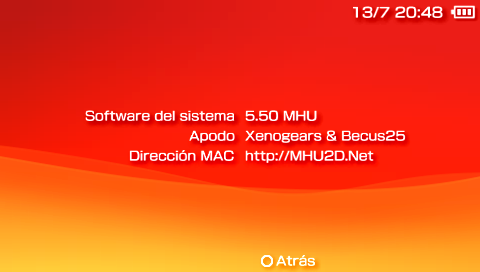
How to install 5.50 MHU CFW on your PSP:
- Extract the MHU files to your computer.
- Copy the PSP folder to your PSP’s memory stick. (Yes, just drag the whole folder there)
- Extract the 550.pbp files to your computer. Rename it (the file’s name is EBOOT.pbp) to SCE.pbp. This is important!
- Copy the SCE.pbp to X:PSP\GAME\UPDATE folder
- Disconnect the PSP from USB.
- Run 5.50 UPDATE from under Game on your PSP’s XMB
- After all process is complete, press X. Your PSP will reboot.
- Congratulations, you’ve just installed 5.50 MHU
Important Notes:
- Always use the M33 driver. The SonyNP9660 driver doesn’t work.
- Update network doesn’t work. It will get the official firmware so don’t use it.
What do I get with Custom firmware 5.50 MHU?
- All functions of the official 5.50 firmware
- The [Information Board] has been added under [PlayStation Network]
- Support for Internet security service provided by Trend Micro has been added to [Internet Browser]
- An icon for built-in Internet Search has been added to the menu bar of your browser
- Option to search for the game title on Google.
- It is now possible to see an additional level of hierarchy under [Photo] [Music] and [Video]
PS3 owners are already familiar with this feature. It displays news and updates from SCEE in the upper right corner of the screen. You can now obtain information about the games ahead of the new content available on the Playstation Store, and other news from your PSP even if you are connected to WiFi.
End Micro Web Security: use technology to block access to malicious sites that can steal personal information and confidential –
Trend Micro Kid’s Safety: You can block access to websites with inappropriate content.Instead of having to point your browser to Google then search, you can do your searches directly on your XMB.
By selecting the icon of the game and then pressing triangle and selecting running Internet Search, you get to search for sites using the name of the game.
- Launch of UMDs to ISOs to CSOs and demos require firmware 5.02 or below
- Launch homebrews
- Launch of PS1 games (converted to PSP)
- Access to Recovery mode (adjusts the processor speed of the PSP, FLASH access, use plug-ins etc.).
Credits:
Dark_AleX – For his M33
Genyus – By GEN
Post a comment if you need help or clarifications.
Tags: 5.50, 5.50 MHU, Custom Firmware





it works ! thanks
kabayan me again! mas ok b toh kesa s 5.00 m33-6? thanx!
If habol mo ung PSN games na ito ang requirement. Otherwise I suggest sticking to 5.00 M33
It worked. But all my games can’t load after I upgrade.. Screen black out after game startup..Pls help
Have you tried changing the ISO mode? (press select on the XMB)
already changed to M33
How to downgrade to lower version
Read this guide: Installing custom firmware without a Pandora Battery. Jump to the Hellcat’s recovery tool part. It’s what you need.
kabayan…if i try this? pede ko pa bang ibalik sa 5.00 M33 ang firmware koh? thanx…
Yep. Puntahan mo lang ung link na bingay ko kay cloud 😀
i’m a little bit confuse… i can still use my pandora battery to return to 5.00 M33… am i right? thanx…
Yep. Pero if you don’t have pandora, the Hellcat’s recovery tool will do fine.
Hellcat’s recovery tool part cant load as well. screen black out…pls help
Looks like you need to reflash your PSP with a pandora battery.
thanx kabayan… i will try this
god bless u!
Wah wala pa for slims T_T. Oh well, will wait nalang.
anu meron sa CFW na ‘to sa 5.50 Gen-A & B?
anu pagkakaiba n2 sa 5.50 GEN A & B?
tol, pwede ko ba install sa psp ko to:
5.00 m33-6
PSP – 2006 model
kaya ba nian un? hindi ba mabribrick?
basta hinde nawawala ung CFW mo kapag pinatay mo ung PSP mo (off inde standby) pede yan.
panung nawawala? hm d ku maxadong gets…salamat..=)
NEVER USE HELLCATs RECOVERY FLASHER ON PSP 3000! IT WILL BRICK IT LEAVINg LED FLASHING AND SCREEN BLACK!!!!!!!!!!!!!!
pano ko malalaru ung tekken 6 eh db 5.50 lang un?? 5.51 kasi ung version ko and psp 3k pa xa. panu po to??? help??? my brother updated it sa wifi then mag 1 year nako di makapaglaro since binili ko ung psp ko. help people!! 🙁
Sadly, wala pang way to downgrade a PSP-3000.
I try this and get the error
Game cannot be started 800200001
please help
I can’t seem to get this working on my PSP (slim, cfw 3.71 m33), it states when I run the program that my battery needs to be 78% and I’m sure that it is. Any help for this would be appreciated.
btw I love Mio, excellent character
You might have a hackable PSP so this guide may be the one for you:
http://atmaxplorer.com/2009/07/convert-your-psp-to-custom-firmware-without-pandora-battery/